Salesforce Winter ’26 brings a range of practical updates designed to help support teams work faster, smarter, and more efficiently. Here’s what’s new in Service Cloud, and how it can improve agent productivity and customer experience.
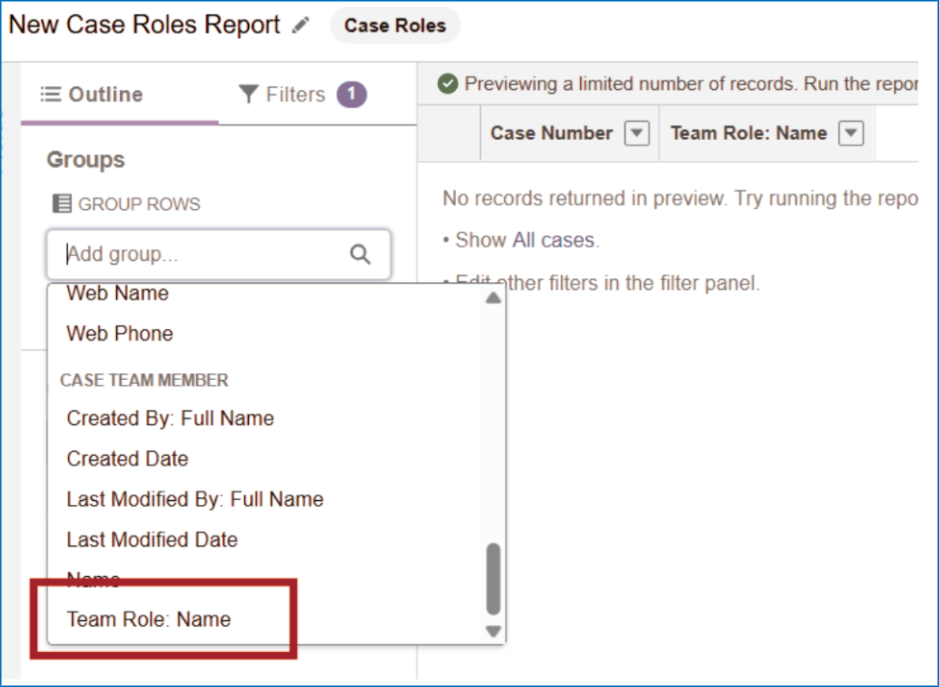
Case Team Member Contributions (Role-based Reporting)
- Reports can now include a “Team Role: Name” field linking case team members to roles.
- Enables visibility into who did what in a case (accountability, credit attribution).
Rich Text in Case Descriptions (Beta)
- Case description fields support rich text formatting: lists, images, highlights, etc.
- This is in Beta and must be enabled via Setup > Support Settings.
Inbound Email Limit for Email-to-Case
- Each Case now has a maximum cap of 250 inbound emails.
- When the limit is exceeded, incoming emails are rejected, and an exception email is sent to the Automated Case User.
Suggested Quick Text Messages
- As agents type replies, Salesforce suggests matching Quick Text snippets inline (based on what they type and recent usage).
- Reduces friction to find and insert standard responses.
Inline Video Playback in Messaging Conversations
- Video attachments from customers can now be played directly within the messaging window (no need to download).
- Useful for walkthroughs, demos, or visual diagnostics.
HR Service (Rebrand + Features)
- Employee Service is renamed HR Service.
- New capabilities under HR Service include:
- Campaign Management for Employees (via Data Cloud): send targeted communications (e.g. for new hires, benefits reminders)
- 35 new portal components: e.g. Case Comments Publisher, User Profile Summary, Global Search, Language Selector
Multi-Party Calls in Service Cloud Voice (Pilot)
- In pilot mode, organizations using Service Cloud Voice + Amazon Connect can add multiple participants to a call (e.g. bring in specialists or managers).
- Facilitates collaboration during complex support calls.
SLA / Milestones & Routing Enhancements
- Time to Next Milestone field can be displayed in Case list views to highlight pending SLA deadlines.
- Pause individual milestones when waiting for external input (customer, other team) so SLA metrics reflect real waiting periods.
- Accept By Date metric added to Omni-Channel routing to prioritize work by when a case must be accepted.
- Simplified SLA setup is more broadly supported / GA in this release.
Knowledge / Self-Service Improvements
- AI-Generated Summaries of knowledge articles to help readers quickly assess relevance.
- Dynamic Q&A Sections: automatically display related frequently asked questions on article pages to reduce navigation efforts.
Survey Enhancements
- Admins can set how long partial survey responses are retained (from 1 to 15 days).
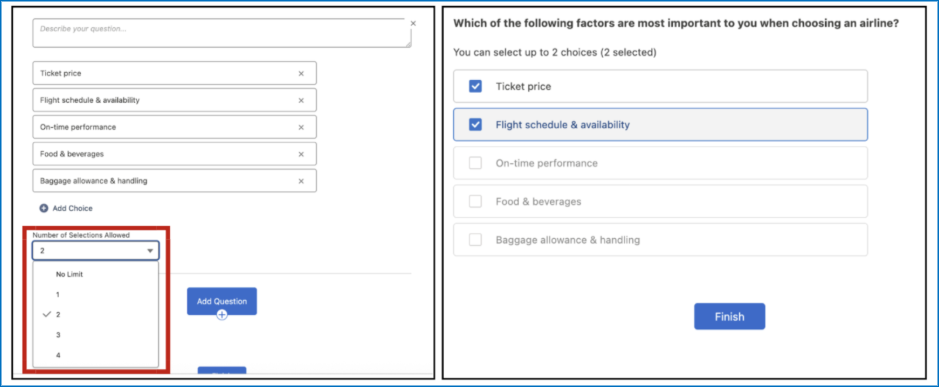
- Option to limit number of choices in multi-choice questions to prevent overly broad responses.
- Translation support added for Knowledge feedback forms (multi-language feedback).
Service Assistant: Find & Show Similar Cases
- Agents can now see suggested resolved cases that closely match the one they are working on (semantic matching).
- Requires configuration of a data retriever and enabling in Setup.
- Available in Lightning, under certain license/feature prerequisites (Einstein for Service / Agentforce, etc.).
Dependencies, Limits & Caveats
- Many features are Beta or Pilot, meaning they might not be fully available or stable in all orgs.
- Some updates require specific licenses or editions (e.g. Einstein for Service, Agentforce).
- You must enable certain features (e.g. rich text descriptions, similar cases), they are not automatically on.
- Existing automations, flows, or triggers (especially those assuming unlimited email threads or static SLA logic) may need revisiting to avoid breakage.
- Always test in a sandbox before enabling production.